How Zivian Health Uses Orkes Conductor to Build Durable Healthcare Compliance Workflows
State-mandated compliance for nurse practitioners (NPs) and physician assistants (PAs), known together as advanced practice providers (APPs), is complex and one of the most underestimated constraints on healthcare business growth. Zivian Health’s platform operationalizes these rules for healthcare organizations, removing the manual administrative work required to deploy and manage APP workforces at scale.
Much of the complexity of APP compliance comes from the formal clinical oversight relationships many states require as a condition for APPs to practice. These clinical collaborations pair an APP with a collaborating physician who provides required oversight, and the oversight a physician must provide varies widely by state. In addition, some states require compliance filings for a collaboration to be valid, and others require a formal medical board approval process.
For the teams managing these relationships, that regulatory variation becomes a major operational problem. Every collaboration has to move through the right sequence of agreements, signatures, filings, approvals, and internal decisions based on the rules that apply to that provider and state.
Take onboarding a single collaboration between a PA and a physician. It begins in our CRM as an opportunity, becomes a collaboration in our platform, goes to an e-signature service for the collaborative agreement, then moves into board filing, where the path depends on scope of practice, prescribing authority, and the requirements of the state medical board. Once these gates have been cleared, the collaboration can go live, and Zivian providers can see their status, share charts, chat, and see billing and payment in the platform.
Each of those steps touches multiple systems, and at any point the process may need to stop and wait for an operator. That happens when a rule can’t be codified, or when the right call needs a manual lookup. The system has to pause the in-flight process, notify a Zivian subject matter expert, and wait for their ruling before it carries on.
Even more, our enterprise customers administer dozens or hundreds of collaborations, and both Zivian’s internal team and its customers need to know where each one stands in real time.
So every process we build shares four needs:
- Configurable rules: The path through a workflow has to change based on the regulations and facts that apply to a particular clinical oversight relationship.
- Durable integrations: Workflows span our own services and third-party systems, and they need to tolerate failures, retries, and long-running processes without losing state or duplicating work.
- Human decision points: When software reaches the limit of what we can safely codify, the workflow needs to pause for an expert and resume once that expert has made a decision.
- Observable status: Operations, product support, and ultimately our customers need a reliable view of where an in-flight process stands and what, if anything, is blocking it.
Before Conductor
The onboarding process existed before we built it in Conductor. It was a series of manual steps and point-to-point integrations. The CRM would trigger a hook in the e-signature system, the CRM would trigger a hook in our platform APIs, and the e-signature system would trigger a hook in our platform APIs. In some cases the CRM called our APIs, which called the e-signature system, which called our APIs again. Every system knew about every other one. That’s a great way to get off the ground fast, which is critical for a small company, but eventually the seams start to show and the process breaks down more often than not. Many of those triggers also started with an operator clicking a button, so human error was built in.
We could have kept building on that, with our own models, async runners, retry logic, and failure handling. That’s negative engineering, a term Prefect popularized for code that handles failure but adds no value to the product. The value of the Zivian platform is the configurable rules, the third-party integrations, and knowing when to ask an expert. It isn’t in building retry logic or debugging async runners. We wanted to orchestrate our processes on top of existing fault tolerance, durability, and observability patterns.
Choosing an orchestrator
Our needs were straightforward: less negative engineering, more observability and fault tolerance, and a clean fit with the tools we know, namely Python. We also wanted our operations and product support teams to have visibility and control, which meant a UI where they could follow and investigate running workflows.
I’ve worked with Airflow, Prefect, Camunda, and Conductor, and spent a short time with Temporal. We use Airflow at Zivian for data pipelines, but Airflow and Prefect are built for pipeline orchestration, not microservice orchestration. Camunda, Temporal, and Conductor are all strong in this space, so the decision came down to fit. When we started in February 2025, Camunda’s Python client was community-maintained, with no officially supported SDK (Camunda released one in April 2026). Temporal’s timeline view is excellent, but Temporal workflows are code, so the UI shows what a workflow has done rather than a diagram of the whole workflow. Our operations team needed the diagram.
After some local prototyping, we chose Conductor. The UI gave operations and support clear visibility into running workflows, the Python SDK got us moving quickly, and the project’s longevity gave us confidence it was well used and well supported. Partnering with Orkes let us try it quickly as a proof of concept, and gave us a crucial feature not readily available in open source Conductor: Human Tasks with a pre-built UI for operators. Human Tasks are simple — a predefined form (using JSON Forms) and a way to complete it in the Orkes UI — and very powerful. They let us automate a process even when we didn’t have every answer needed to fully automate it. In health care compliance, there are always edge cases. When one comes up, a Human Task asks a subject matter expert, while the fully automated cases follow the same configurable, observable flow.
The first workflow
Our first project with Conductor automated a process tracked in spreadsheets, with a lot of manual overhead. Multiple operators relied on clicking buttons across our CRM, our billing system, and our application at the right time. The workflow validated the operator’s input against the state of all three systems, emailed customers about the account change, used a Human Task to get more details from operators when needed, then waited until the event date and made the system changes.
The improvement was immediate. There were fewer mistakes, the execution was visible in the Orkes UI, and operators were freed for more valuable work. When an error occurred, it was clear in the logs and the UI, and when the process needed support or a configuration change, engineering and product support both had more control. That same workflow still runs the same process, over a year and a half later.
Designing onboarding
Following that success, we took on onboarding. It was a huge undertaking: bring a new collaboration in from the CRM, generate and sign the collaborative agreement with our e-signature vendor, walk through the state medical board filing step by step (the work is manual, but it needs step-wise processing and status updates), and finally, once every gate had passed, activate the collaboration so the APP could begin patient care.
With Conductor, we flipped the problem on its head. Instead of point-to-point integrations, every automated call and human touch point became part of a workflow. One “umbrella” workflow coordinates a sequence of smaller, purpose-driven workflows, each representing a stage of onboarding. Where the same steps recur, sub-workflows (workflows inside workflows) encapsulate them.
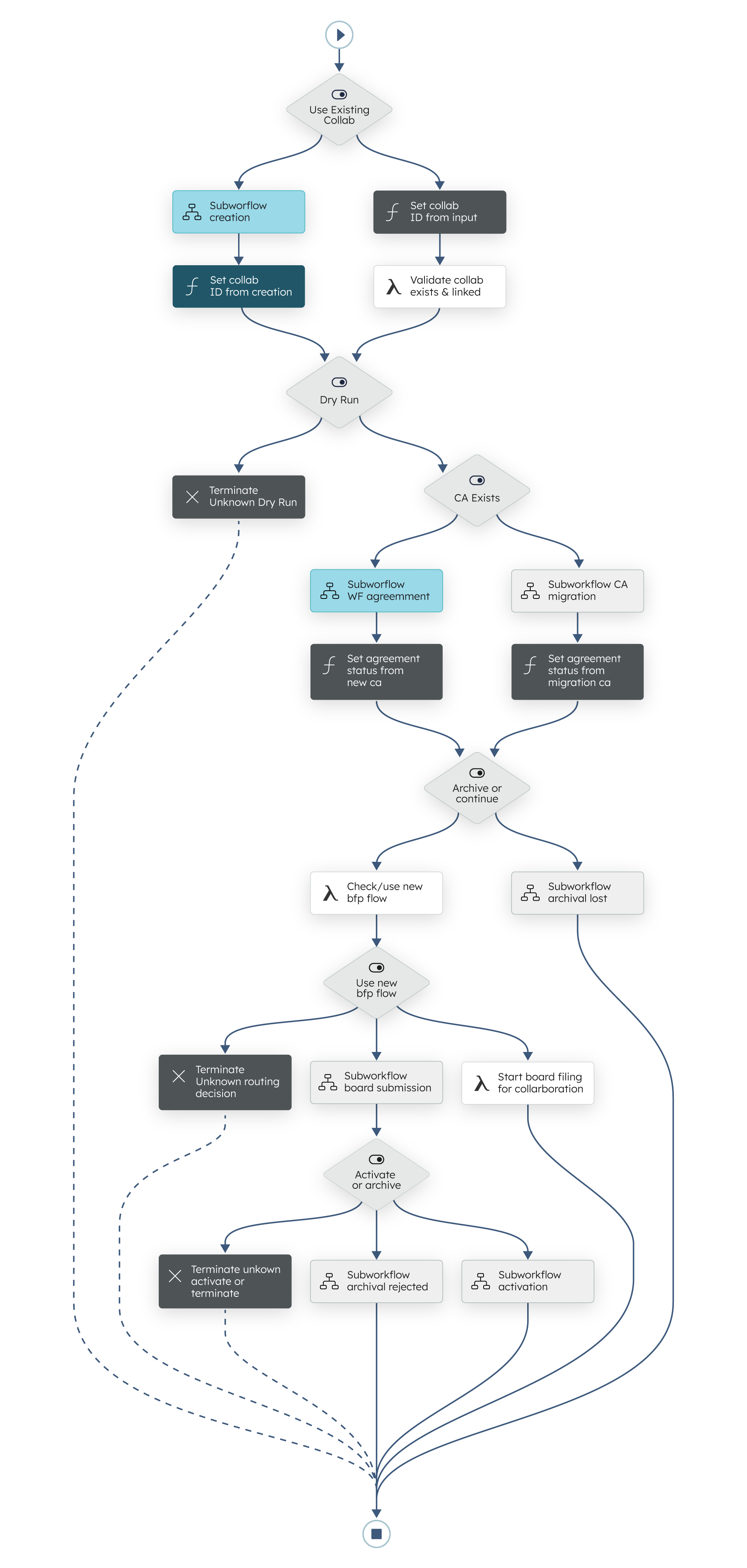
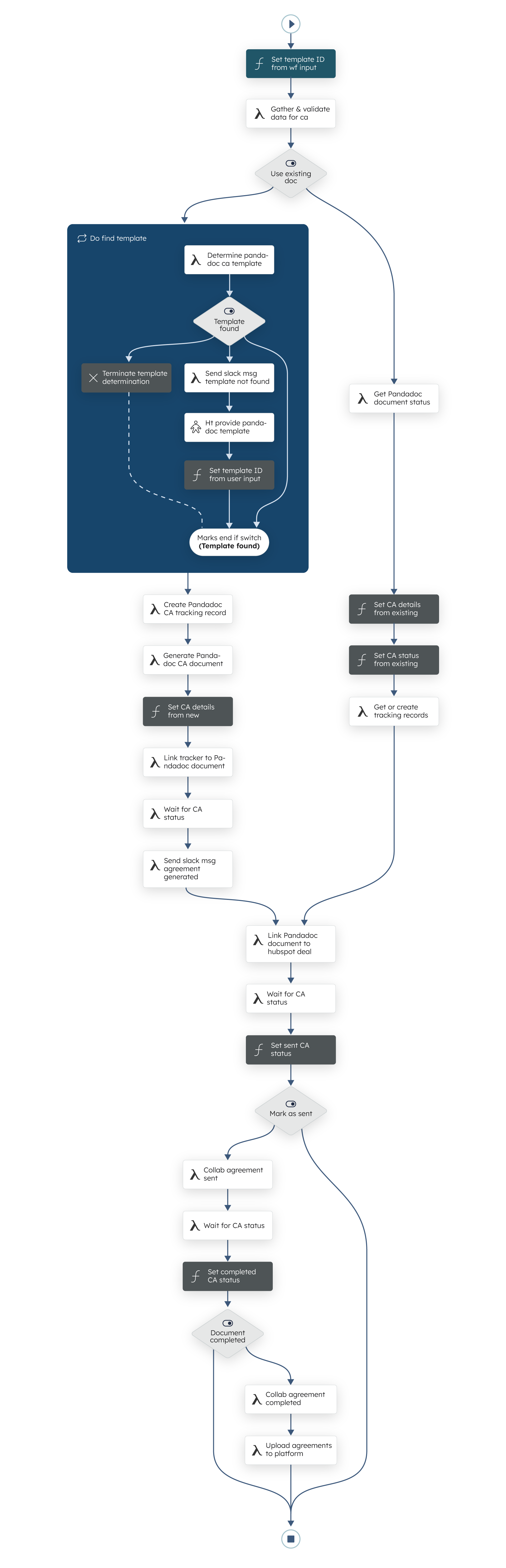
Our highest objective was to write status into our application database at every step, so we could surface it in our application UI. That’s what gives enterprise customers their real-time status, and it means our users never need to see Conductor at all.
Tasks were designed to be small and idempotent. Some read or write external systems, some update only our own system, Human Tasks sit wherever a decision is needed, and others send notes to operator channels when someone needs to act.
What went wrong, and what we changed
This project came with a much larger learning curve. We had to learn how Conductor really works (versioning, task scheduling, retry configuration and semantics, task I/O) and work out how to make our own tasks idempotent, which isn’t always straightforward with external systems.
Versioning turned out to be a tool rather than a trap. When we changed a workflow in a way that wasn’t backwards compatible, we bumped its version and had the caller pick the version that fit the inputs it had.
This is where the framework really began to pay off. We no longer wrote complicated retry logic or relied on webhook retries for redundancy; we used task retry configurations. We no longer wrote fully specced API endpoints just to update a database field; we used Python native tasks that call our service code and execute business rules directly. We no longer left retries up to chance; we built idempotency into our tasks so the system is fault tolerant from the start.
Not everything went smoothly, and each problem left a practice that every new workflow now follows:
- Duplicate workflows: We added UI features to start workflows, but it wasn’t clear when one was already running. A user could start several onboarding workflows for the same CRM record, which led to confusion. Now we store a record of every workflow execution in our application database, saying why it started and which records it relates to. Before starting another, we check those records and ask the Conductor cluster for the status of any match.
- Bad inputs: Workflows need integers rather than strings, valid enum values to pick a path, and only certain combinations of options. We had IDs arrive as strings and fail tasks halfway through, misspelled enum values send switch tasks down the wrong path, and invalid combinations, such as a record ID plus a flag saying to look that record up. Every workflow now defines an input schema (JSON Schema), which drastically reduced failed starts.
- Failures we heard about last: Failed workflows reached us as support tickets from operations or product support, which meant delays and frustration. Now failure workflows, which run when a workflow terminates unsuccessfully, alert a Slack channel we monitor, and engineering can correct the issue before a ticket arrives.
- Fire and forget: Nothing broke here, but early on we started workflows and didn’t talk to them unless they failed. Our operators would rather not log into the Orkes UI, and APPs and physicians have no access to it. So our application uses the Conductor API to see which tasks a workflow is waiting on and to signal a waiting workflow to continue. The controls live in our UI, and Conductor does the work behind the scenes.
Where we are now
Since going live, the onboarding workflow has carried several thousand collaborations through onboarding. We’ve made many improvements, with more in progress, but the building blocks are the same as the day it went live. Operations works the Human Tasks, and product support uses the Orkes UI to triage and fix issues. In total the engineering team has built 32 workflows, including license verification and more state medical board filing processes, and at last count we’ve executed 51,060 workflow instances in production.
If I were starting again, I’d use correlation IDs from day one. Finding a workflow is hard if you don’t have a record of it in your own database. Set each execution’s correlation ID to a unique, domain-specific string, such as the ID of the record it operates on, and finding workflows becomes much simpler.
Looking back at those four needs, the only part we build now is the part that’s ours. Our rules stay in our own code, called from native tasks. Durability comes from retry configuration and idempotent tasks. Human Tasks bring in an expert when a rule runs out. And every step writes status our users can see.
Other Case Studies
Collective Transforms its Business Automation Through Orkes Conductor
Read case study
Florence Healthcare accelerates clinical trials by streamlining workflows and infrastructure with Orkes
Read case study
Foxtel's Journey: Scaling Distributed Workflows, Applications, & Microservices with Orkes Conductor
Read case study
Ready to Build Something Amazing?
Join thousands of developers building the future with Orkes.