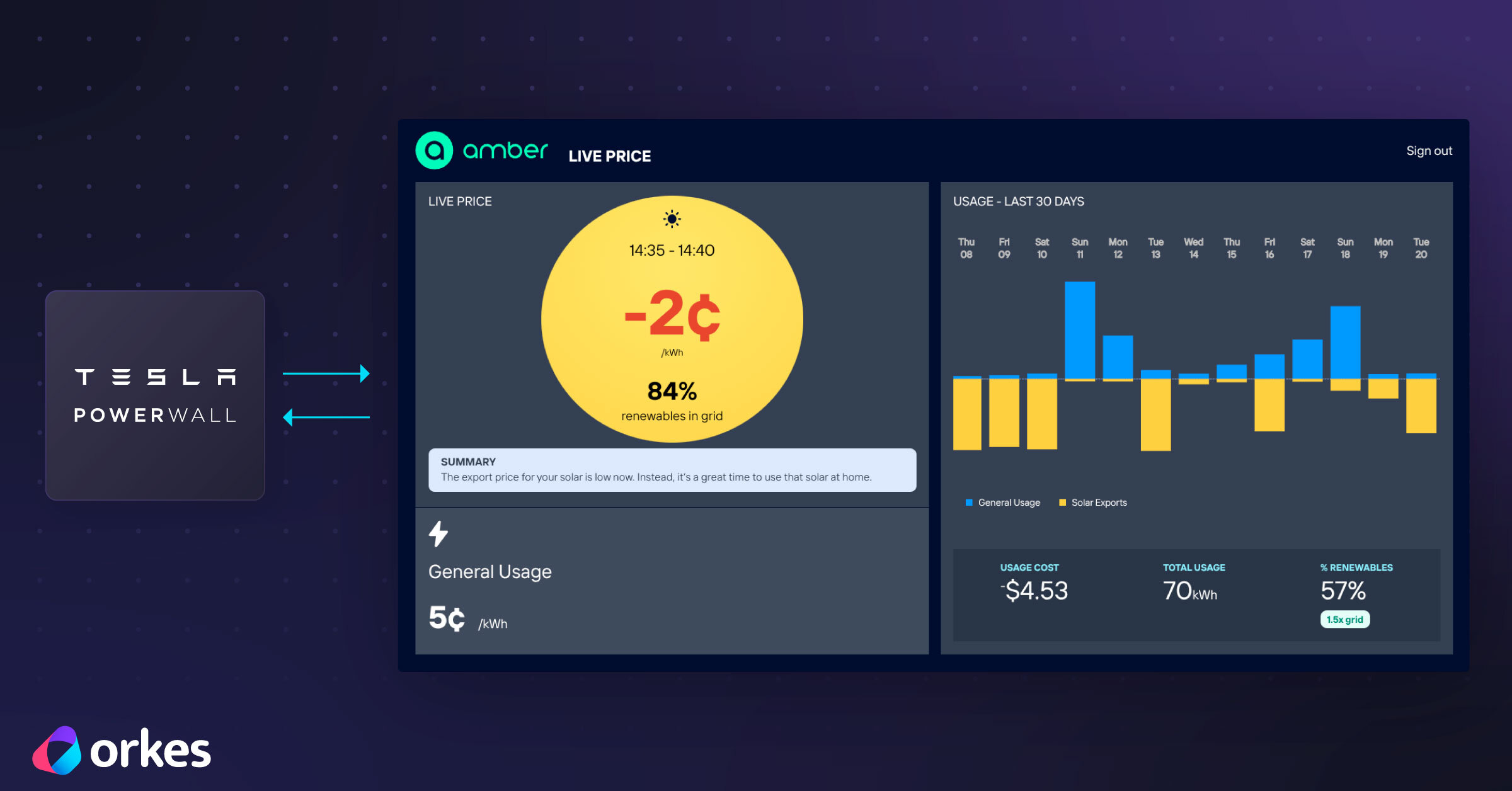
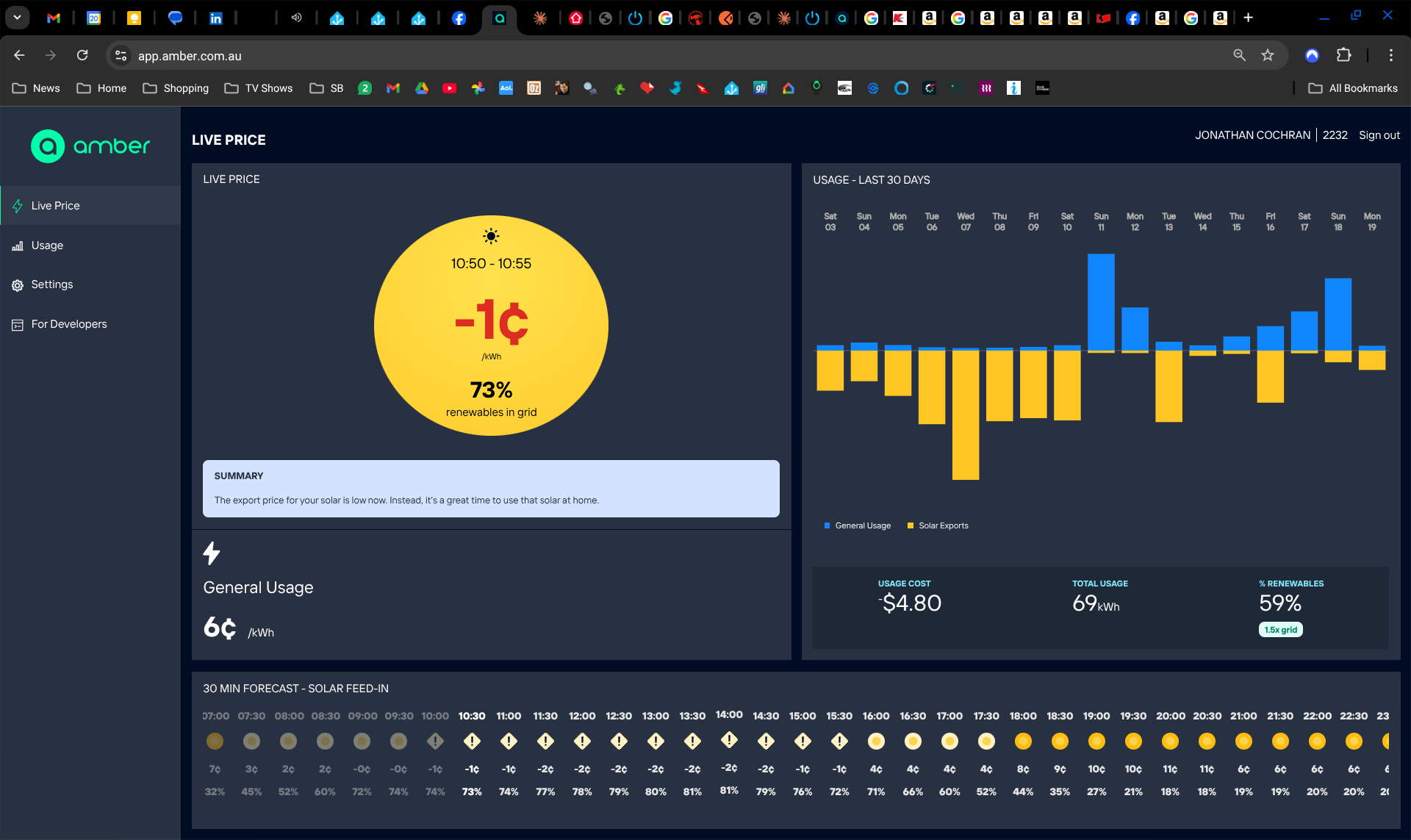
When feed-in rates drop below 0 cents per kWh, you’re actually paying to export excess solar energy to the grid; reducing overall savings and ultimately delaying your system’s payback period. Monitoring price changes and manually updating battery export settings is not practical, given frequent fluctuations.
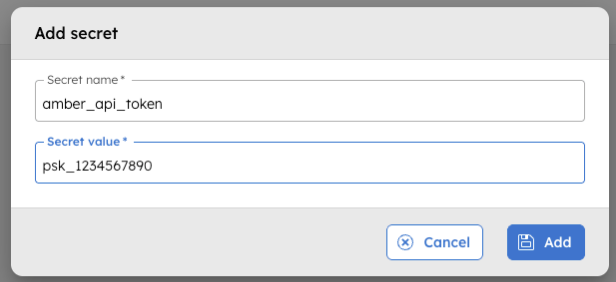
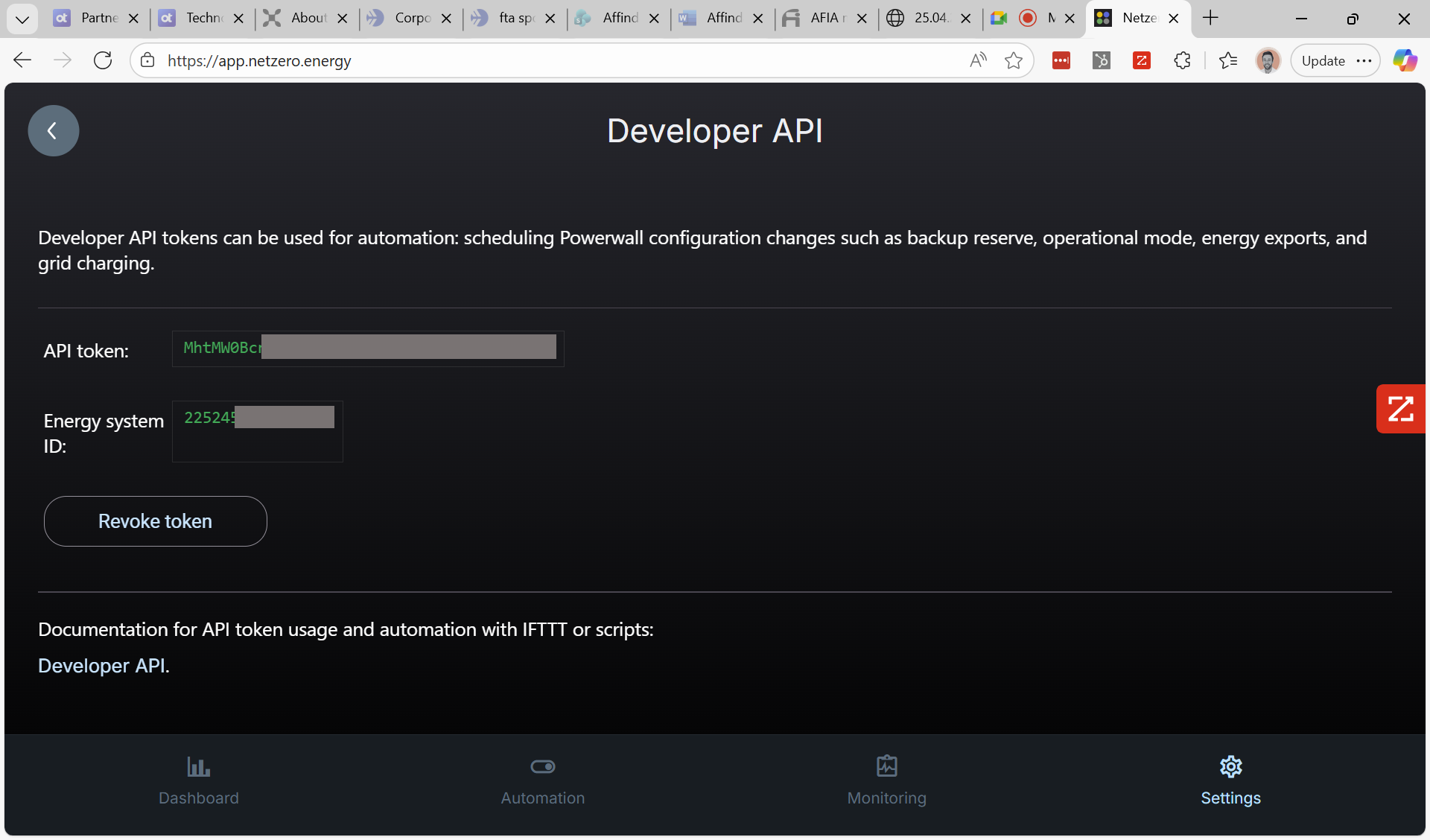
To authenticate API requests, you need an Amber API token and your associated site ID. These values are stored as secrets in Orkes Conductor to prevent sensitive data from being exposed in the workflow definition.
The site ID identifies the location for which pricing data is retrieved. It can be retrieved by making an API call using tools like Postman or cURL.
The workflow definition created later in this tutorial will reference these secrets.
{
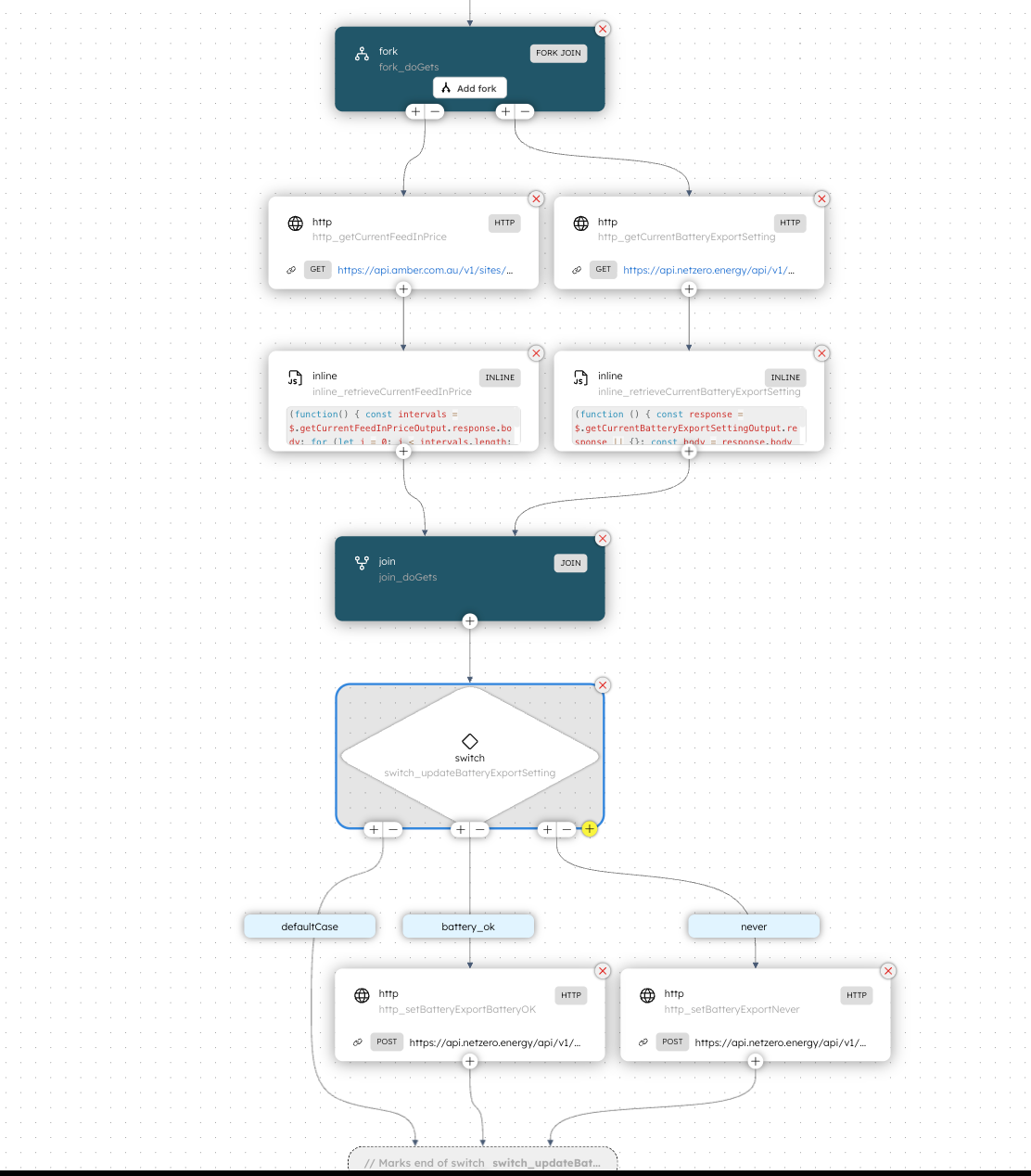
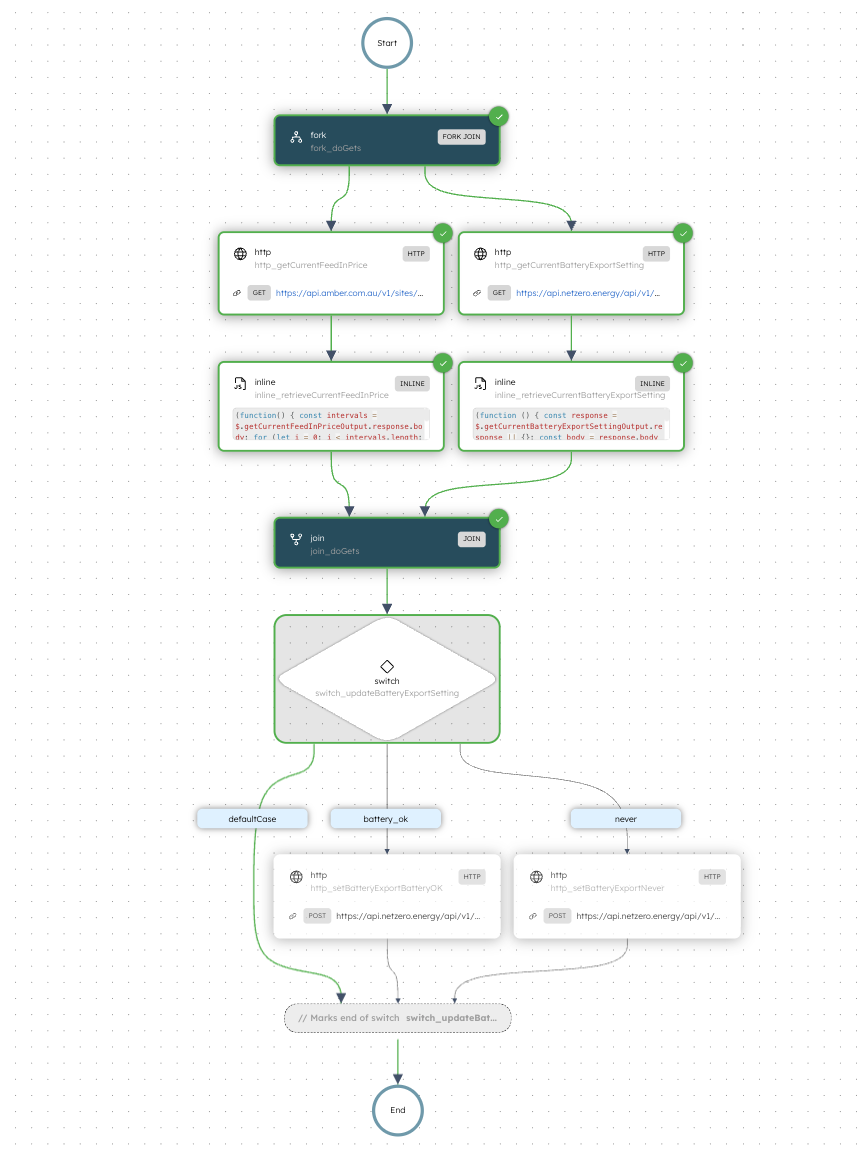
  "name": "TeslaPowerwallSolarCurtailment",
  "description": "Prevents export to grid during times of negative feed-in rates when paired with Amber Electric's wholesale energy plan",
  "version": 1,
  "tasks": [
    {
      "name": "fork",
      "taskReferenceName": "fork_doGets",
      "inputParameters": {},
      "type": "FORK_JOIN",
      "decisionCases": {},
      "defaultCase": [],
      "forkTasks": [
        [
          {
            "name": "http",
            "taskReferenceName": "http_getCurrentBatteryExportSetting",
            "inputParameters": {
              "uri": "https://api.netzero.energy/api/v1/${workflow.secrets.netzero_site_id}/config",
              "method": "GET",
              "accept": "application/json",
              "contentType": "application/json",
              "encode": true,
              "hedgingConfig": {
                "maxAttempts": 3
              },
              "headers": {
                "Authorization": "Bearer ${workflow.secrets.netzero_api_token}"
              }
            },
            "type": "HTTP",
            "decisionCases": {},
            "defaultCase": [],
            "forkTasks": [],
            "startDelay": 0,
            "joinOn": [],
            "optional": false,
            "taskDefinition": {
              "createTime": 0,
              "updateTime": 0,
              "retryCount": 3,
              "timeoutSeconds": 0,
              "inputKeys": [],
              "outputKeys": [],
              "timeoutPolicy": "TIME_OUT_WF",
              "retryLogic": "FIXED",
              "retryDelaySeconds": 60,
              "responseTimeoutSeconds": 3600,
              "inputTemplate": {},
              "rateLimitPerFrequency": 0,
              "rateLimitFrequencyInSeconds": 1,
              "backoffScaleFactor": 1,
              "totalTimeoutSeconds": 0,
              "outputSchema": {
                "createTime": 0,
                "updateTime": 0,
                "name": "",
                "version": 1,
                "type": "JSON"
              },
              "enforceSchema": false
            },
            "defaultExclusiveJoinTask": [],
            "asyncComplete": false,
            "loopOver": [],
            "onStateChange": {},
            "permissive": false
          },
          {
            "name": "inline",
            "taskReferenceName": "inline_retrieveCurrentBatteryExportSetting",
            "inputParameters": {
              "expression": "(function () {\n  const response = $.getCurrentBatteryExportSettingOutput.response || {};\n  const body = response.body || {};\n\n  if (body.energy_exports || body.energy_exports === null)\n    return body.energy_exports;\n\n  throw \"unable to retrieve current battery export setting\";\n})();",
              "evaluatorType": "graaljs",
              "getCurrentBatteryExportSettingOutput": "${http_getCurrentBatteryExportSetting.output}"
            },
            "type": "INLINE",
            "decisionCases": {},
            "defaultCase": [],
            "forkTasks": [],
            "startDelay": 0,
            "joinOn": [],
            "optional": false,
            "defaultExclusiveJoinTask": [],
            "asyncComplete": false,
            "loopOver": [],
            "onStateChange": {},
            "permissive": false
          }
        ],
        [
          {
            "name": "http",
            "taskReferenceName": "http_getCurrentFeedInPrice",
            "inputParameters": {
              "uri": "https://api.amber.com.au/v1/sites/${workflow.secrets.amber_site_id}/prices/current",
              "method": "GET",
              "accept": "application/json",
              "contentType": "application/json",
              "encode": true,
              "hedgingConfig": {
                "maxAttempts": 3
              },
              "headers": {
                "Authorization": "Bearer ${workflow.secrets.amber_api_token}"
              }
            },
            "type": "HTTP",
            "decisionCases": {},
            "defaultCase": [],
            "forkTasks": [],
            "startDelay": 0,
            "joinOn": [],
            "optional": false,
            "taskDefinition": {
              "createTime": 0,
              "updateTime": 0,
              "retryCount": 3,
              "timeoutSeconds": 0,
              "inputKeys": [],
              "outputKeys": [],
              "timeoutPolicy": "TIME_OUT_WF",
              "retryLogic": "FIXED",
              "retryDelaySeconds": 60,
              "responseTimeoutSeconds": 3600,
              "inputTemplate": {},
              "rateLimitPerFrequency": 0,
              "rateLimitFrequencyInSeconds": 1,
              "backoffScaleFactor": 1,
              "totalTimeoutSeconds": 0,
              "outputSchema": {
                "createTime": 0,
                "updateTime": 0,
                "name": "",
                "version": 1,
                "type": "JSON"
              },
              "enforceSchema": false
            },
            "defaultExclusiveJoinTask": [],
            "asyncComplete": false,
            "loopOver": [],
            "onStateChange": {},
            "permissive": false
          },
          {
            "name": "inline",
            "taskReferenceName": "inline_retrieveCurrentFeedInPrice",
            "inputParameters": {
              "expression": "(function() {\n  const intervals = $.getCurrentFeedInPriceOutput.response.body;\n\n  for (let i = 0; i < intervals.length; i++) {\n    let interval = intervals[i];\n\n    if (interval.channelType === \"feedIn\")\n      return interval.perKwh;\n  }\n\n  throw \"unable to retrieve feed-in price per Kwh\";\n})();",
              "evaluatorType": "graaljs",
              "getCurrentFeedInPriceOutput": "${http_getCurrentFeedInPrice.output}"
            },
            "type": "INLINE",
            "decisionCases": {},
            "defaultCase": [],
            "forkTasks": [],
            "startDelay": 0,
            "joinOn": [],
            "optional": false,
            "defaultExclusiveJoinTask": [],
            "asyncComplete": false,
            "loopOver": [],
            "onStateChange": {},
            "permissive": false
          }
        ]
      ],
      "startDelay": 0,
      "joinOn": [],
      "optional": false,
      "defaultExclusiveJoinTask": [],
      "asyncComplete": false,
      "loopOver": [],
      "onStateChange": {},
      "permissive": false
    },
    {
      "name": "join",
      "taskReferenceName": "join_doGets",
      "inputParameters": {},
      "type": "JOIN",
      "decisionCases": {},
      "defaultCase": [],
      "forkTasks": [],
      "startDelay": 0,
      "joinOn": [
        "inline_retrieveCurrentBatteryExportSetting",
        "inline_retrieveCurrentFeedInPrice"
      ],
      "optional": false,
      "defaultExclusiveJoinTask": [],
      "asyncComplete": false,
      "loopOver": [],
      "onStateChange": {},
      "permissive": false
    },
    {
      "name": "switch",
      "taskReferenceName": "switch_updateBatteryExportSetting",
      "inputParameters": {
        "currentBatteryExportSetting": "${join_doGets.output.inline_retrieveCurrentBatteryExportSetting.result}",
        "currentFeedInPrice": "${join_doGets.output.inline_retrieveCurrentFeedInPrice.result}"
      },
      "type": "SWITCH",
      "decisionCases": {
        "never": [
          {
            "name": "http",
            "taskReferenceName": "http_setBatteryExportNever",
            "inputParameters": {
              "uri": "https://api.netzero.energy/api/v1/${workflow.secrets.netzero_site_id}/config",
              "method": "POST",
              "accept": "application/json",
              "contentType": "application/json",
              "encode": true,
              "body": {
                "energy_exports": "never"
              },
              "hedgingConfig": {
                "maxAttempts": 3
              },
              "headers": {
                "Authorization": "Bearer ${workflow.secrets.netzero_api_token}"
              }
            },
            "type": "HTTP",
            "decisionCases": {},
            "defaultCase": [],
            "forkTasks": [],
            "startDelay": 0,
            "joinOn": [],
            "optional": false,
            "defaultExclusiveJoinTask": [],
            "asyncComplete": false,
            "loopOver": [],
            "onStateChange": {},
            "permissive": false
          }
        ],
        "battery_ok": [
          {
            "name": "http",
            "taskReferenceName": "http_setBatteryExportBatteryOK",
            "inputParameters": {
              "uri": "https://api.netzero.energy/api/v1/${workflow.secrets.netzero_site_id}/config",
              "method": "POST",
              "accept": "application/json",
              "contentType": "application/json",
              "encode": true,
              "body": {
                "energy_exports": "battery_ok"
              },
              "hedgingConfig": {
                "maxAttempts": 3
              },
              "headers": {
                "Authorization": "Bearer ${workflow.secrets.netzero_api_token}"
              }
            },
            "type": "HTTP",
            "decisionCases": {},
            "defaultCase": [],
            "forkTasks": [],
            "startDelay": 0,
            "joinOn": [],
            "optional": false,
            "defaultExclusiveJoinTask": [],
            "asyncComplete": false,
            "loopOver": [],
            "onStateChange": {},
            "permissive": false
          }
        ]
      },
      "defaultCase": [],
      "forkTasks": [],
      "startDelay": 0,
      "joinOn": [],
      "optional": false,
      "defaultExclusiveJoinTask": [],
      "asyncComplete": false,
      "loopOver": [],
      "evaluatorType": "graaljs",
      "expression": "(function() {\n  // priceKwh feed in > 0 represents negative feed in to grid - exporting should be stopped\n  if ($.currentFeedInPrice > 0 && $.currentBatteryExportSetting !== \"never\")\n    return \"never\";\n  else if ($.currentFeedInPrice <= 0 && $.currentBatteryExportSetting !== \"battery_ok\")\n    return \"battery_ok\";\n  else\n    return false;\n})();\n",
      "onStateChange": {},
      "permissive": false
    }
  ],
  "inputParameters": [
    "netzero_api_token",
    "netzero_site_id",
    "amber_api_token",
    "amber_site_id"
  ],
  "outputParameters": {},
  "failureWorkflow": "",
  "schemaVersion": 2,
  "restartable": true,
  "workflowStatusListenerEnabled": false,
  "ownerEmail": "your.email@gmail.com",
  "timeoutPolicy": "ALERT_ONLY",
  "timeoutSeconds": 0,
  "variables": {},
  "inputTemplate": {},
  "rateLimitConfig": {
    "rateLimitKey": "max",
    "concurrentExecLimit": 1
  },
  "enforceSchema": true,
  "metadata": {},
  "maskedFields": []
}
This saves the workflow with references to the configured API tokens and site IDs. You only need to modify the workflow if you have saved the secrets using names different from those specified in the tutorial.
To test the workflow for the first time, wait for the feed-in price to fall to a negative value and then run the workflow, by selecting the Execute button.
After the execution completes, open the Tesla Powerwall app and verify that the system is not exporting surplus energy to the grid.
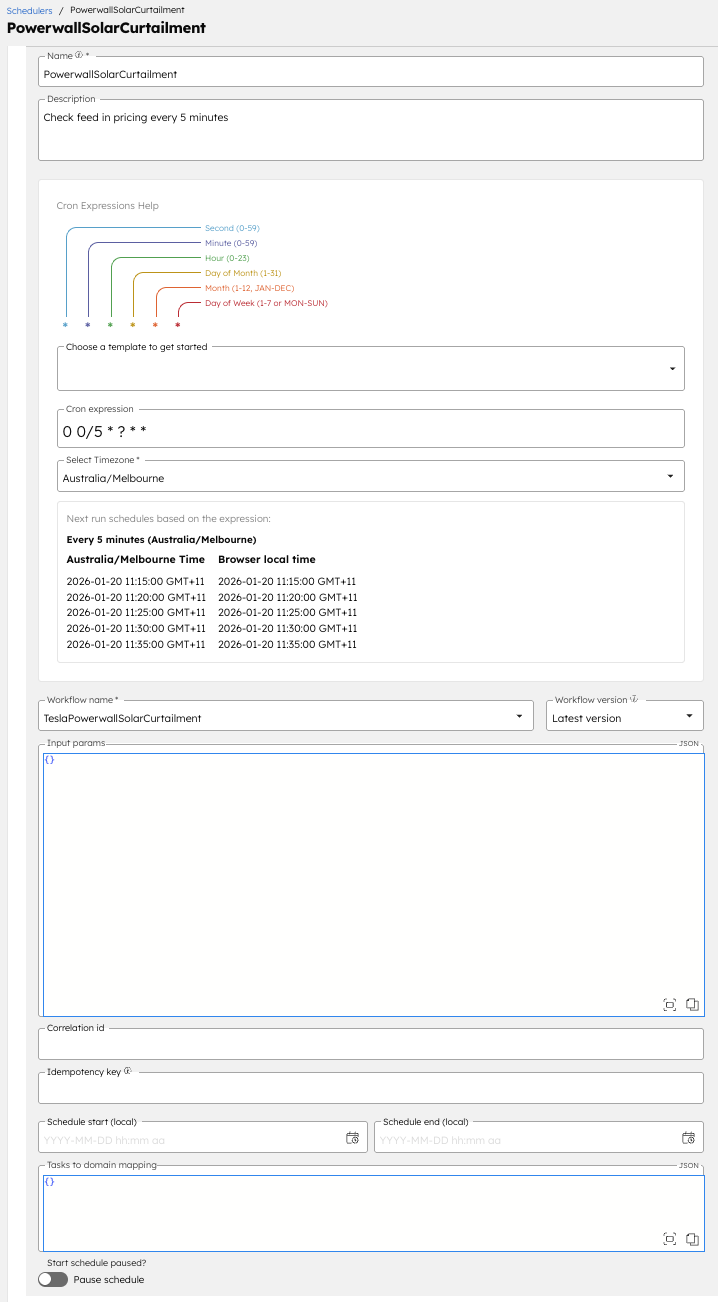
In the last step, you ran the workflow manually. To automate this process, schedule the workflow to run every five minutes using Conductor’s Workflow Scheduler.
This ensures the workflow runs every five minutes and continuously evaluates whether energy export should be enabled or disabled based on current pricing.
And that’s it! Your Tesla Powerwall is now optimised to prevent exporting to the grid when feed-in prices are negative, saving you money and expediting the payback period of your equipment.
No, this is a complimentary service that will not impact SmartShift’s ability to optimise other aspects of your system.
Nothing! Orkes Developer Edition and NetZero’s Basic tier are free to use.